Note: Assignment 5 is a double assignment. Each milestone (MS1 and MS2) is worth 1/6 of the assignments grade for the course, the same as (individually) Assignments 1–4.
Due:
- Milestone 1 due Mon Apr 20th by 11pm
- Milestone 2 due Mon Apr 27th by 11pm (no late hours allowed)
Note that you may not use late hours on Milestone 2. Please plan accordingly.
Updates:
4/14: updated the Updater Client and Display Client sections to clarify that
- A
MessageType::ERRORresponse to a login request should result in the client printing an error message tostd::cerrand immediately exiting with a non-zero exit code - When the status of an order changes to
OrderStatus::DELIVERED, it should be immediately removed from the display client’s collection of orders, before the display is refreshed
4/15: linked to a screencast video with some suggestions for running and testing the client and server programs.
4/19: added content to the Server section, and added
Synchronization of Shared Data,
MessageQueue, Broadcasting to Display Clients,
and Synchronization Report sections.
These changes include all of the information you should need to
complete Milestone 2 of the assignment.
4/20: fixed to clarify that the IO::send and IO::receive functions
are declared in include/io.h.
Quick Guide
Here are the high-level steps we recommend for completing the assignment.
For Milestone 1:
- Implement the
Wire::encodeandWire::decodefunctions. Get all of the unit tests in themessage_testsunit test program working. (See the Encoding section.) - Implement the
IO::sendandIO::receivefunctions. Get all of the unit tests in theio_teststest program working. (See the Framing section.) - Implement the
updaterclient and test it - Implement the
displayclient and test it
For Milestone 2:
- Implement the
Server::server_loopmember function so that the server listens for TCP connections from clients. For each client that connects, create aClientobject, and in a new detached thread, call itschatmember function to communicate with the remote client. - Implement the
Client::chatmember function sufficiently that the client can log in. Test that you can log in successfully using thenc(netcat) program. You can also try using your client implementation or the reference client implementations, although they won’t work fully until you implement the server functionality. - Add functionality to the
ClientandServerclasses to implement the required server functionality. You’ll need to add a central data structure toServerto keep track of orders, and use appropriate synchronization so that client threads can access the data concurrently. - Implement the protocol for communicating with an updater client.
This will involve code in both
ServerandClient. - Implement the protocol for communicating with a display client.
Each
Clientshould have aMessageQueueobject that the code in theServerobject can use to post messages to be sent to the remote display client program which the state of any order or item changes. You’ll need to implement theMessageQueue::enqueueandMessageQueue::dequeuemember functions.
Milestone 2 tasks 3–5 will likely be the most challenging ones, although they should only involve a couple hundred lines of code, which should be fairly straightforward if you have thought about the problem and determined how to factor the problem into helper functions.
Specifying the intended behavior of a networked application entails some complexity. This assignment description aims to document everything you need to know to implement the server and clients for the restaurant order system.
The good news is that the assignment skeleton file (see Getting Started) includes reference executables for all three programs. You can use them as reference for how your programs should work. Also, you can use them to test your programs. For example, in Milestone 1, it will make sense to use the reference server implementation to test your client program implementations against.
Also, the two unit test programs should make it fairly straightforward to implement encoding, decoding, sending, and receiving of messages. Once that code works, implementing the actual application protocol is relatively easy, and fun!
Grading Criteria
Milestone 1:
- message encoding/decoding: 10%
- framing functions: 10%
- updater client implementation: 12.5%
- display client implementation: 12.5%
- design and coding style: 5%
Milestone 2:
- server implementation: 37.5%
- concurrency report: 7.5%
- design and coding style (server): 5%
Getting Started
To get started, download csf_assign05.zip and unzip it.
In the extracted csf_assign05 directory, the include directory has header
files and the src directory has C++ source files. The build directory is
where compiled object files and executable files will be generated.
Generating header file dependencies (do this before compiling
for the first time, or any time you add or change any #include
directives):
make depend
To compile all executables:
make -j8
The -j8 option tells make to use up to 8 processes to run commands,
allowing you to take advantage of multiple CPU cores. You can adjust the
number to adjust the degree of parallelism.
The ref directory contains the server, updater, and display
executables compiled from the reference solution. They demonstrate the
expected functionality, and you can use them to test your clients and
server. (I.e., you can use the reference server to test your clients,
and the reference clients to test your server.)
The following screencast video demonstrates running the programs, and how you can use the netcat program to emulate a client or server for testing purposes:
https://jh.hosted.panopto.com/Panopto/Pages/Viewer.aspx?id=42dc6767-076e-47a4-8bf0-b42d01350c73
Overview
In this assignment, you will implement two network clients and a network server which together form a restaurant order system. The general idea is that this system could be used to keep track of current orders in a restaurant, encompassing point of sale (order entry), display (so the workers in the kitchen can see what needs to be prepared), and updating the status of orders (so that the back of house staff can see which items still need to be prepared, and deliver the food to the wait staff when the items are ready.)
The server maintains a collection of orders. Each order is a collection of items. Full details about orders and items are given in the Object Model section.
The updater client creates new orders and updates the status of existing items and orders. The display client shows the current state of all active orders and their constituent items.
The clients and server communicate with each other by sending messages. Full details about messages, their encoding, and the general network protocol are given in the Protocol and Encoding sections.
Restaurant Order System
This section documents the object model and network protocol to be implemented in the restaurant order system.
Object Model
The object model is the collection of data types representing orders, items,
their statuses, and other important information. All of these types are
declared in the include/model.h header file and defined
in src/model.cpp.
OrderStatus is an enumeration type representing the status of an order. Its
members are OrderStatus::INVALID, OrderStatus::NEW, OrderStatus::IN_PROGRESS,
OrderStatus::DONE, and OrderStatus::DELIVERED. (Note that OrderStatus::INVALID
is not a valid status, and is used only to represent the absence of a valid
order status.)
ItemStatus is an enumeration type representing the status of an item within an
order. Its members are ItemStatus::INVALID, ItemStatus::NEW, ItemStatus::IN_PROGRESS,
and ItemStatus::DONE. (As with OrderStatus, the ItemStatus::INVALID member
is not a valid status.)
The Order class represents an order and its constituent items. It has a unique
integer identifier, and OrderStatus value, and a collection of item objects.
The Item class represents an item within an order. It has an order id (which is
the unique id of the order the item is part of), an integer item id (which is
unique within the overall order), an ItemStatus value, a description string, and
an integer quantity (which must be positive).
The Order and Item classes have a variety of accessor functions for inspecting
and modifying their data.
The ClientMode enumeration type has three members, ClientMode::INVALID,
ClientMode::UPDATER, and ClientMode::DISPLAY. The last two are used to
distinguish the two kinds of clients. When a client logs in, it includes the
client mode it wants to use, depending on which kind of client it is.
(The ClientMode::INVALID value doesn’t represent a valid client type,
but it can be useful to indicate that the client mode is unknown.)
Messages
A message is a bundle of information sent from client to server (a “request”)
or from server to client (a “response”). The Message class, defined in
include/message.h, represents one message.
The MessageType enumeration defines the various types of messages. These will
be described in more detail in the Protocol section.
The Message class is designed to be able to represent any message.
Each message type has a specific combination of data values it contains.
So, the Message class’s fields and accessor functions represent the
union of all data values a single message could contain.
Protocol
The following table summarizes the message types, which program sends messages of that type, and what information a message of that type will contain.
| Message type | Sent by | Reeived by | Contained data values |
|---|---|---|---|
MessageType::LOGIN |
updater or display | server | client mode, string |
MessageType::QUIT |
updater | server | string |
MessageType::ORDER_NEW |
updater | server | order |
MessageType::ITEM_UPDATE |
updater | server | order id, item id, item status |
MessageType::ORDER_UPDATE |
updater | server | order id, order status |
MessageType::OK |
server | updater or display | string |
MessageType::ERROR |
server | updater or display | string |
MessageType::DISP_ORDER |
server | display | order |
MessageType::DISP_ITEM_UPDATE |
server | display | order id, item id, item status |
MessageType::DISP_ORDER_UPDATE |
server | display | order id, order status |
MessageType::DISP_HEARTBEAT |
server | display | none |
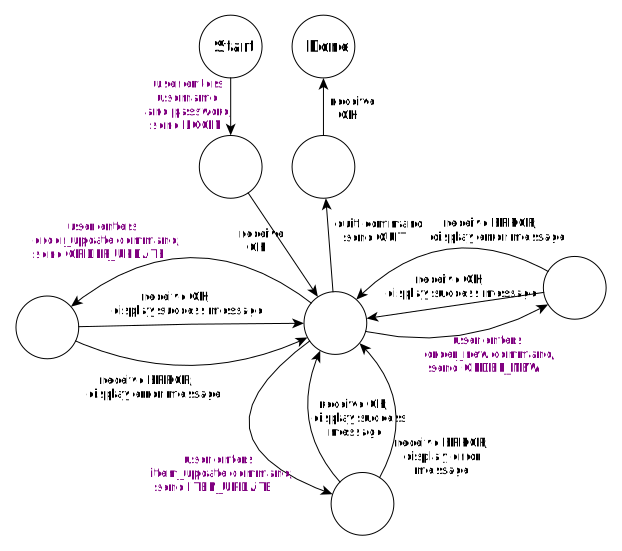
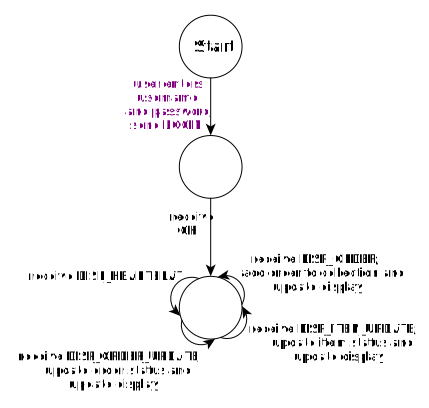
The protocols implemented by the updater client, display client, and server are described by the following state machines. In each state machine, the nodes (circles) represent states, and the transitions (arrows) represent events. Each transition involves either sending or receiving a message. The “Start” node represents the initial state, and the “Done” node indicates that the conversation has finished and the network connection will be terminated.
Note that the edge labels in purple represent interactive commands that the user enters.
Updater state machine:
Display state machine:
Server state machine:
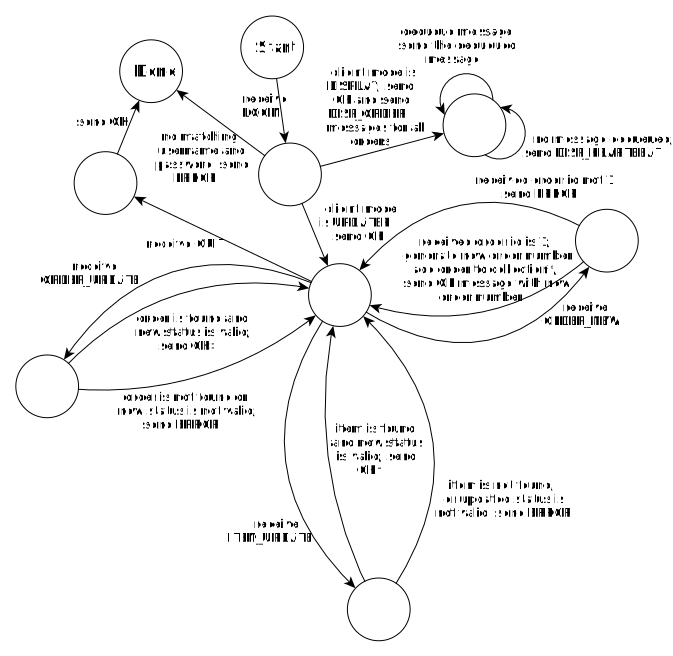
The server state machine describes the protocol implementing a conversation between the server and one client.
Note the following special cases in the server’s state machines (indicated with the *, †, and ‡ symbols in the state diagram):
* When a new order is created and added to the collection, the server should
enqueue a MessageType::DISP_ORDER message containing the order data to
the message queues of each active display client.
† When a MessageType::ITEM_UPDATE message is successfully processed, the server
should enqueue a MessageType::DISP_ITEM_UPDATE message containing the item id
and new item status to the message queues of each active display client. Also,
if as a result of applying the item update, the order status transitions from
OrderStatus::NEW to OrderStatus::IN_PROGRESS, or if the order status
transitions from OrderStatus::IN_PROGRESS to OrderStatus::DONE, the server
should enqueue a MessageType::DISP_ORDER_UPDATE message with the order id and
new order status to the message queue of each active display client.
‡ When a MessageType::ORDER_UPDATE message is successfully processed, the
server should enqueue a MessageType::DISP_ORDER_UPDATE message with the
order id and new order status to the message queue of each active display
client.
Encoding
In order to be sent and received via a TCP connection, a message is represented
as a string, i.e., a sequence of bytes. The Wire::encode and Wire::decode
functions (declared in include/wire.h and defined in in src/wire.cpp)
implement conversion of a Message object to and from a string representation.
In the table of message types in the Protocol section, you
will note that the last column is called “Contained data values”. The
entries in this column describe the “payload” of the message. The string
representation of a message consists of the message type, followed by the
contained data values (in order), with all items separated by a single
“|” character.
A MessageType value can be converted to a string using the
Wire::message_type_to_str function.
Integer data values such as order id and item id are encoded as a sequence of
base 10 digits. You can use the std::to_string function to do this conversion.
OrderStatus and ItemStatus values can be converted to a string using
(respectively) the Wire::order_status_to_str and Wire::item_status_to_str
functions.
MessageType::ORDER_NEW and MessageType::DISP_ORDER messages contain an
Order as the payload value. An Order is converted to a string
consisting of the order id, order status, and item list, separacter by comma
(“,”) characters. The item list is a sequence of 1 or more items, separated
by semicolon (“;”) characters. Each item is encoded as a string consisting of
order id, item id, item status, description string, and integer quantity,
each separated by colon (“:”) characters.
Note that you may assume that the separator characters “|”, “,”, “;”, and
“:” will never occur in a string value within an encoded message.
The message_tests unit test program (make build/message_tests) has fairly
comprehensive unit tests for message encoding and decoding. When you reach
the point where all of the unit tests pass, you can have confidence that
your implementations of Wire::encode and Wire::decode are working correctly.
Framing
Framing is the problem of determining where transmitted messages begin and
end. The framing format for messages in the restaurant order system consists
of a four-digit length value, followed by an encoded message string, followed
by a single newline (“\n”) character. The length value specifies the number
of bytes comprised by the encoded message string and the newline. For example,
to frame the encoded message OK|successful login, the length value would
be 0020, since the encoded message is 19 characters long, and the newline
contributes one extra character, for a total length of 20.
This framing scheme is an example of run-length encoding, which means that messages are preceded by the exact length of the message contents to follow, so that when receiving a message, the received can read the length (a known number of bytes), and then know exactly how many additional bytes to expect. Contrast this approach with a “terminating sentinel” style of framing, where the end of a message is indicated by a special sentinel character or character sequence.
The IO::send and IO::receive functions (declared in include/io.h
and defined in src/io.cpp) frame and unframe a string value (i.e., an
encoded message). IO::send writes the framed string to a file descriptor
(e.g., a TCP socket), and IO::receive reads a framed string from a
file descriptor. Note that these functions should throw IOException
if any I/O error or EOF occurs.
The io_tests unit test program (make io_tests) tests the implementation
of IO::send and IO::receive. Once these tests pass, you can be
reasonably confident that your implementations of IO::send and IO::receive
are working well.
Sending and Receiving Messages
Once you have the encoding and framing functions working, it is very easy to send and receive messages.
Let’s say that a Message object m represents a message you want to send,
and that fd is the file descriptor of the TCP socket connecting to the
remote peer application. You can do so with the code
std::string s;
Wire::encode(m, s);
IO::send(s, fd);
Similarly, if you want to receive a message from the remote peer, the code would be something like
Message m;
std::string s;
IO::receive(fd, s);
Wire::decode(s, m);
// m now contains the received message
Implementation details
This section has further information about implementing the clients and server.
Shared Pointers
The model object classes (Order, Item, Message), and classes designed to be
containers for model objects (e.g., Message and MessageQueue) consistently
use std::shared_ptr to manage dynamically allocated objects. This approach
has some important advantages:
std::shared_ptruses reference counting, and deletes the managed object when the last pointer to it goes out of scope; this is a simple form of garbage collection, and ensures that allocated objects won’t be leaked- because objects managed by
std::shared_ptrare dynamically allocated, they are safe to transfer from one thread to another
If you want to create an object to be managed by std::shared_ptr, don’t use
the new operator, use the std::make_shared function. Its syntax is
std::make_shared<ClassName>(ConstructorArgs)
where ClassName is the name of the class you want the new managed object to be
an instance of, and ConstructorArgs are any arguments you want to pass to the
constructor of the new object. For example, if order is a std::shared_ptr
managing an Order object, and you want to create a shared pointer to a new
Message object that you can use to broadcast that order to display clients as
a MessageType::DISP_ORDER message, you could use the code
auto order_new_msg =
  std::make_shared<Message>(MessageType::DISP_ORDER, order);
Note that shared pointers should be passed by value and returned by value if you need to pass them to or return them from functions.
The Updater Client
The updater client encapsulates both point-of-sale functionality (e.g., creating new orders) and back of house functionality (updating the status of items and orders.)
The updater client is invoked as
./build/updater HOSTNAME PORT
where HOSTNAME is the hostname or IP address the server is running on,
and PORT is the TCP port number on which the server is listening for
connections.
When the updater client starts, it should prompt the user to enter a username
and password using the prompt text “username: ” and “password: ”.
(Note that there is a space after the colon in each prompt, and also that
the program should not print a newline after the prompt.)
The updater client should combine the entered username and password into a
single credential string of the form “username/password”, and send it to the
server as a MessageType::LOGIN message. The server will respond with
either a MessageType::OK or MessageType::ERROR message. If an ok response is
received, the client continues to execute the command loop. Otherwise it prints an
error message of the form
Error: error text
to std::cerr where error text is the string payload of the MessageType::ERROR
message received from the server, and immediately exit with a non-zero exit code.
The command loop works as follows. The client prints the prompt “> ” and
reads a line of text, which is the command name. Commands are handled as follows:
quit: The client sends a MessageType::QUIT message to the server and
receives the server’s response. The server should send back a MessageType::OK
message, and the client exits with an exit code of 0.
order_new: The client reads an integer number of items. Then, it reads
exactly that many items. Each item is read by reading an integer item id,
an item description string, and an integer quantity. The client then sends
a MessageType::ORDER_NEW message containing an order with the specified
items. The order id of the new order should be set to 1. The server will
respond with a MessageType::OK message. The text in that message will
have the form
Created order id OrderId
where OrderId is the actual order id assigned to the order.
item_update: The client reads an order id, item id, and item status.
It sends a MessageType::ITEM_UPDATE message with the information entered.
The server responds with a MessageType::OK or MessageType::ERROR message.
order_update: The client reads an order id and an order status.
It sense a MessageType::ORDER_UPDATE message with the information entered.
The server responds with a MessageType::OK or MessageType::ERROR message.
Note that when reading the additional values entered by the user
for the order_new, item_update, and order_update commands, each value
is read on a separate line, and the client should not print a prompt
for any of the entered values. You should use std::getline to ensure that
a complete line of text is read.
Note that there is no requirement to do anything special to handle invalid commands or input values. When testing your updater client, the autograder will only provide well-formed input.
For the order_new, item_update, and order_update commands, if the
server responds with MessageType::OK, the client should print a success
message to std::cout of the form
Success: text
where text is the string payload of the received message. If the
server responds with MessageType::ERROR, the client should print a failure
message to std::cout of the form
Failure: text
where text is the string payload of the received message.
Note that for these commands (the commands other than quit) the
command loop continues regardless of whether the response received
was MessageType::OK or MessageType::QUIT.
If any I/O errors occur, if any invalid or incorrectly-formed message data is received, or if the server does not correctly implement the protocol as described in the Protocol section, the client should print an error message of the form
Error: explanation
to std::cerr, where explanation is any arbitrary text. In addition, if
an error message is printed, the program should exit with a non-zero
exit code to indicate failure.
Here is a transcript showing a run of the updater client, with user input in bold:
username: alice
password: foobar
> order_new
2
42
Veggie burger
1
101
Curly fries
2
Success: Created order id 1000
> item_update
1000
42
IN_PROGRESS
Success: successful item update
> item_update
1000
101
IN_PROGRESS
Success: successful item update
> item_update
1000
42
DONE
Success: successful item update
> order_new
1
67
Chocolate shake
1
Success: Created order id 1001
> quit
The Display Client
The display client implements a basic information display showing the status of all orders currently in the system.
It is invoked with the command
./build/display HOSTNAME PORT
where (as with the updater program) HOSTNAME is the hostname or IP address
of the system where the server is running, and PORT is the TCP port the
server is listening on.
The display client will prompt the user for a username and password in exactly the same way as the updater client. A login failure should be handled the same way as the updater client.
If the login is successful, the display client should clear the screen by
printing the contents of the CLEAR_SCREEN string to std::cout. Note that
you will need to flush the output buffer to make sure the contents of this
string are sent right away, i.e.
std::cout << CLEAR_SCREEN << std::flush;
Once the server responds with the MessageType::OK response to the
MessageType::LOGIN request, the display client should enter a loop
where it receives messages from the server. These messages should be handled
as follows:
MessageType::DISP_ORDER- Add a new order to the collection of orders
MessageType::DISP_ITEM_UPDATE- Update the status of a specific item within one of the current orders
MessageType::DISP_ORDER_UPDATE- Update the status of a specific current order
MessageType::DISP_HEARTBEAT- Do nothing; these messages are sent by the server only to detect display clients no longer connected
For all received messages other than MessageType::DISP_HEARTBEAT messages,
after processing the received message, the client should clear the screen,
and then refresh the display by printing the information in all orders.
The orders should be printed in increasing order by order id. (Hint: using a
std::map to manage the collection of current orders will make this easy.)
As a special case, if the display client receives a
MessageType::DISP_ORDER_UPDATE message changing the status of an
order to OrderStatus::DELIVERED, the order should be removed from
the collection of orders before the display is refreshed.
In other words, when the status of an order changes to delivered,
it immediately disappears from the display.
The format for printing each order is as follows.
To begin printing an order, print (to std::cout) a line of the form
Order OrderId: OrderStatus
where OrderId is the order id, and OrderStatus is the order status.
Next, print each item, in the order in which the items appeared in the
earlier MessageType::DISP_ORDER message which added the order to the
display.
Printing an item consists of two lines. The first line has the form
Item ItemId: ItemStatus
where ItemId is the item id, and ItemStatus is the item status, and the second line has the form
ItemDescription, Quantity Qty
where ItemDescription is the item description string, and Qty is the item quantity.
Note that the first line of an item is preceded by two spaces, and the second line of an item is preceded by four spaces.
Note that once the username and password have been entered, the display client does not read any further user input. You can terminate a display client by typing Control-C in the terminal it’s running in.
Here is what the display client would show in the terminal after the updates sent in the example session in the Updater Client section:
Order 1000: IN_PROGRESS
  Item 42: DONE
    Veggie burger, Quantity 1
  Item 101: IN_PROGRESS
    Curly fries, Quantity 2
Order 1001: NEW
  Item 67: NEW
    Chocolate shake, Quantity 1
The Server
For each client that connects to the server, the server should follow the server protocol according to the state diagram shown in the Protocol section.
You will need to implement the Server::server_loop member function
so that it accepts TCP connections from clients, and for each one,
starts a new thread to communicate with the client. Note that this
member function does not return. The only way to terminate the server
process is to send it a signal such as SIGTERM.
You should create a new instance of the Client class to manage
the resources needed by a client thread. A pointer to the Client object
should be passed to the new thread’s start function as its argument.
The thread start function used to start new client threads should
use pthread_detach() and pthread_self() to make the thread a detached
thread, and then call the Client::chat member function of the thread’s
Client object. The chat member function should read requests from
the client and send responses. Note that if the chat member function
throws an exception, you should ensure that the thread is terminated
gracefully, and that all resources (such as the TCP connection) are
cleaned up. Assuming that the Client class’s destructor does this cleanup,
it should be sufficient to ensure that the Client object is deleted
in order to ensure that resources are cleaned up.
When communicating with an updater client, the basic idea is to handle
MessageType::ORDER_NEW, MessageType::ITEM_UPDATE, and MessageType::ORDER_UPDATE
messages by updating the Server object’s collection of Orders.
Each time a new Order is created, a MessageType::DISP_ORDER message
should be broadcast to all connected display clients. MessageType::ITEM_UPDATE
and MessageType::ORDER_UPDATE messages should be handled by updating the
appropriate Item or Order, and broadcasting a MessageType::DISP_ITEM_UPDATE
or MessageType::DISP_ORDER_UPDATE message to active display clients.
Note the following special cases:
- When the client sends a
MessageType::ORDER_NEWmessage, the order id should be set to 1. The server should assign a new, valid order id. The valid order ids start at 1000, and increase by 1 with each new order. - When the first
Itemin anOrderchanges status fromItemStatus::NEWtoItemStatus::IN_PROGRESS, itsOrderchanges status fromOrderStatus::NEWtoOrderStatus::IN_PROGRESS. - When all of the
Items in anOrderhave the statusItemStatus::DONE, theirOrdershould change status toOrderStatus::DONE. - When a
MessageType::ORDER_UPDATEmessage changes the status of anOrdertoOrderStatus::DELIVERED, theOrdershould be removed from the server’s collection of orders.
Note that cases 2 and 3 mean that the server should broadcast both a
MessageType::DISP_ITEM_UPDATE message and a MessageType::DISP_ORDER_UPDATE
message. They should be broadcast in that order (MessageType::DISP_ITEM_UPDATE
first, MessageType::DISP_ORDER_UPDATE second.)
Also note that for both items and orders, status updates must be applied in the correct sequence. Those sequences are as follows:
- For
ItemStatus, the sequence isNEW,IN_PROGRESS,DONE - For
OrderStatus, the sequence isNEW,IN_PROGRESS,DONE,DELIVERED
When an updater client request can’t be handled because the order or item
it refers to doesn’t exist, or when an order or item status change isn’t
valid, the server should send back a MessageType::ERROR response.
We recommend using the SemanticError exception type to represent this
situation.
When communicating with a display client, the Client object should
wait for a shared pointer to a Message object to be enqueued on the
Client object’s MessageQueue. The idea is that when the server needs to
broadcast display updates to all active display clients, it does so by
enqueuing a std::shared_ptr to a Message to each display client’s
MessageQueue. If a shared pointer to a valid Message object can be
dequeued within 1 second, that Message should be sent to the remote
display client over the TCP connection. If no valid Message is available
within one second, a MessageType::DISP_HEARTBEAT message should be send
over the TCP connection. See the MessageQueue, Broadcasting to Display
Clients for further
details.
Another case to be aware of for display clients is that when a display
client connects to the server, it should be sent MessageType::DISP_ORDER
messages for all current orders.
For both updater and display clients, if there an IOException occurs
when receiving or sending a message, the client thread should immediately
cease communicating with the client, clean up resources, and terminate the
thread.
Synchronization of Shared Data
The single Server object should maintain all of the data about Orders,
Items, and their statuses. Each Client object as a pointer to the
Server object. You should add fields and member functions to the Server
class that the Client object can use to have the Server do operations on
the order and item data. Also, the Server will need to be able to
broadcast messages to active display clients, so you will need to implement
a way for the Server instance to keep track of active display clients.
You will need to synchonize access to any data visible to multiple threads.
In general, a pthread_mutex_t is sufficient to control access to shared
data in situations where the only concern is preventing race conditions,
and none of the operations any thread will be performing will involve
waiting for a condition to be true.
MessageQueue, Broadcasting to Display Clients
As we’ve discussed in class, queues are a great way to implement a communication
channel from one thread to another. The MessageQueue class is intended to allow
the server to send (shared) pointers to Message objects to active display
clients. MessageQueue is not intended to be a bounded queue, so there is
no enforced limit on how many messages the server can add to a display client’s
MessageQueue.
You will need to implement a mechanism that allows the client thread invoking
the dequeue() operation to remove message from the queue to wait until either
- The queue contains at least one
Message, or - The queue remains empty for one second
We suggest using a sem_t (semaphore) object to keep track of how many messages
have been added to the queue. Initially, the semaphmore count should be 0.
The enqueue() operation should use sem_post to increment the semaphore,
indicating that there is now one more message in the queue. The dequeue()
member function can use sem_timedwait to wait for the queue to be nonempty.
If you pass a timespec_t value to sem_timedwait set for one second in the
future, sem_timedwait will return with an error if the semaphore count remains
0 for one second. You can use the following code to initialize a timespec_t
value for a time one second in the future:
std::timespec ts;
std::timespec_get(&ts, TIME_UTC);
ts.tv_sec += 1; // wait for one second
You can read more about sem_timedwait using the command man sem_timedwait.
When the server needs to broadcast a message to all active display clients,
it should iterate over the collection of active display clients, and use
MessageQueue::enqueue to add a copy of the message to each display client’s
message queue. Note that you can use Message::duplicate to return a shared
pointer to an exact copy of a specified Message. Giving each display client
thread a shared pointer to a distinct dynamically allocated Message object
is a good idea; allowing threads to access the same object instance can lead
to conflicts, so avoiding unnecessary sharing of objects is a good practice
for multithreaded programming.
Synchronization Report
In your README.txt for Milestone 2, you should write a brief report
explaining how you used synchronization to ensure that your server has
no race conditions or deadlocks. Your report should explicitly indicate
what data is shared between threads, and how that data is synchronized.
Exceptions, RAII
We highly recommend using exceptions to deal with any exceptional circumstance that means that control cannot continue normally in the program.
Some useful exception types are defined in include/except.h.
Wire::decode, IO::send, and IO::receive are required to throw
InvalidMessage and IOException exceptions as appropriate. When any program
(client or server) encounters an improperly-formed or improperly-framed
message, or when an I/O error or EOF condition occurs when reading from
or writing to a TCP socket, the program should immediately cease communication
with the remote peer. By letting these exceptions propagate naturally,
you should be handle them with a single high-level try/catch construct.
The ProtocolError exception type is meant to represent a situation where
a properly-formed message was received, but it violates the protocol as
defined by the relevant state machine. When a remote peer violates the protocol,
the program should immediately cease communication with the remote peer.
The SemanticError exception type is intended to be used by the server for
situations where a message was properly formed, and did not violate the
protocol state machine, but the operation embodied by the message was
not semantically correct. For example, an order cannot have its status changed
unless its status is OrderStatus::DONE, and the only valid order update
that can be requested by an updater client is to change the order status
from OrderStatus::DONE to OrderStatus::DELIVERED. If a member function in
the Server class detects that these rules have been violated, it can throw
SemanticError. This is a useful exception type because it can be caught
in order to detect that the operation requested by the client is invalid,
and the server can send back a MessageType::ERROR message in response.
“RAII” stands for “Resource Acquisition Is Initialization”, and is a C++ philosophy that advocates using a scoped local object to ensure the release of a resource when it is no longer needed. Because destructors for local objects are called regardless of how control leaves a scope, they can ensure that a resource is cleaned up even an exception is thrown. In general, if your program uses exceptions, it should also use RAII consistently to clean up resources.
std::unique_ptr
is useful for implementing RAII for a dynamically allocated object. For example,
in the server, you should pass a pointer to a dynamically allocated Client
object to the thread start function of the thread tasked with communicating with
a client, in order to give the thread the access to the resources it needs.
A std::unique_ptr is a useful way to ensure that this object gets cleaned up
before the thread exist. A mutex guard object implements RAII for a critical
section, ensuring that the mutex is released. For the client programs, you
might find it useful to use RAII to ensure that the client file descriptor
gets closed before the program terminates.
Submitting
You can create a zipfile of your work by running the command
make solution.zip
To submit, upload your solution.zip file to Assignment 5 MS1
or Assignment 5 MS2 on Gradescope, depending on which milestone
you are submitting.
Keep in mind that for Milestone 2, your README.txt should contain
your synchronization report.